A hundred interns on your pipeline, working in your own systems.
Hours back every week, for teams that already work with AI. The Revenue Assistant researches every prospect, keeps your CRM up to date, finds the warm way in through anyone on your team and prepares each next step, in your own systems.
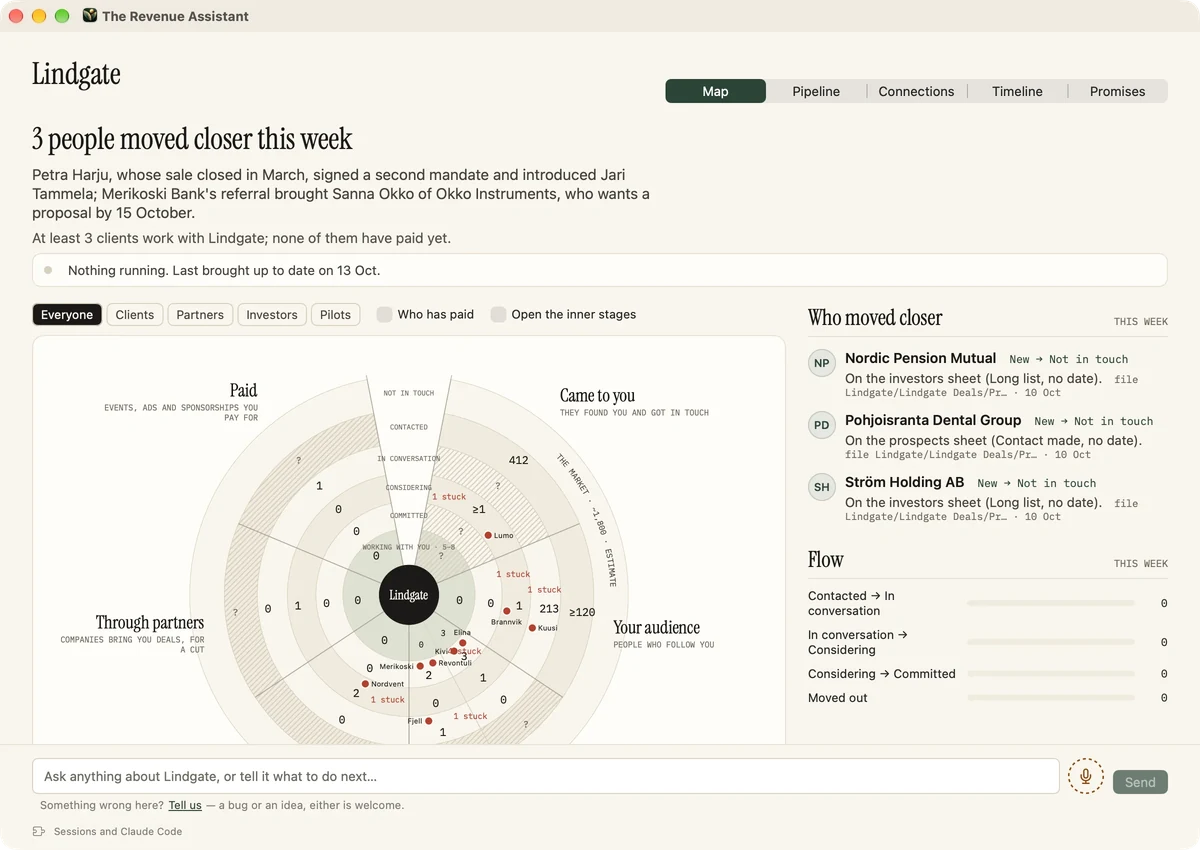
Your CRM, always up to date
Every company in it is checked against our B2B data layer, and your own AI then researches what has changed there and who matters now, next to what you last discussed with them. It is designed to show you each change with the old value, the new one and the reason before it makes it.
Without our data layer, it does the same from the database you already have.
They work in your systems
Your CRM, in Chrome on your computer. Your team's folder in SharePoint or Google Drive. Your own AI, Claude or ChatGPT. All of it signed in as you, and setup is one sentence: open the app and ask it to start. Your deals never reach our servers.
Works with
It works alongside you, in Chrome on your computer, so it works with anything a browser can reach, each signed in as you.
The whole team takes part, not only the salespeople
Anyone on your team can share their LinkedIn connections, exported from LinkedIn in a few clicks. The map then shows who on the team knows whom at each prospect, so the warm way in comes from whoever has it. A colleague can make the introduction or pass a message on without becoming the salesperson.
Each prospect, joined up
For every company and every person, one page brings together what your CRM, your mail and calendar, your team's folder, your team's LinkedIn connections, the public web and our data layer say about them, each line with its source. What sat in five systems is in one place, on your Mac.
Coming: sales and marketing learning from each other
Next, what works in your outreach will feed your ads and your search pages, and what works there will feed your outreach, with the team's experiments kept in one place. This part is not in the app yet.
What they do every day
- They work through your CRM and keep it up to date, one change at a time.
- They research your prospects before you meet them.
- They follow up after every meeting, with a draft for you to approve.
- They keep track of what you promised, and what you were promised.
- They draft the invitation to the next meeting.
How they get you the meeting
Johan at Lindgate, a small advisory firm, wants to talk to Nordvent, a company the size Lindgate sells to.
- They find the company. Nordvent fits what Lindgate does, by the company register and by Nordvent's own site.
- They find the way in. From the LinkedIn connections Johan and his colleague Sofia exported, they see that Sofia knows Camilla Nord, who runs Nordvent.
- They work out what Nordvent would gain. They read Nordvent's site, how it sells and what it charges, and write a short business case.
- They draft the introduction request to Sofia, and the opener to Camilla built on the business case.
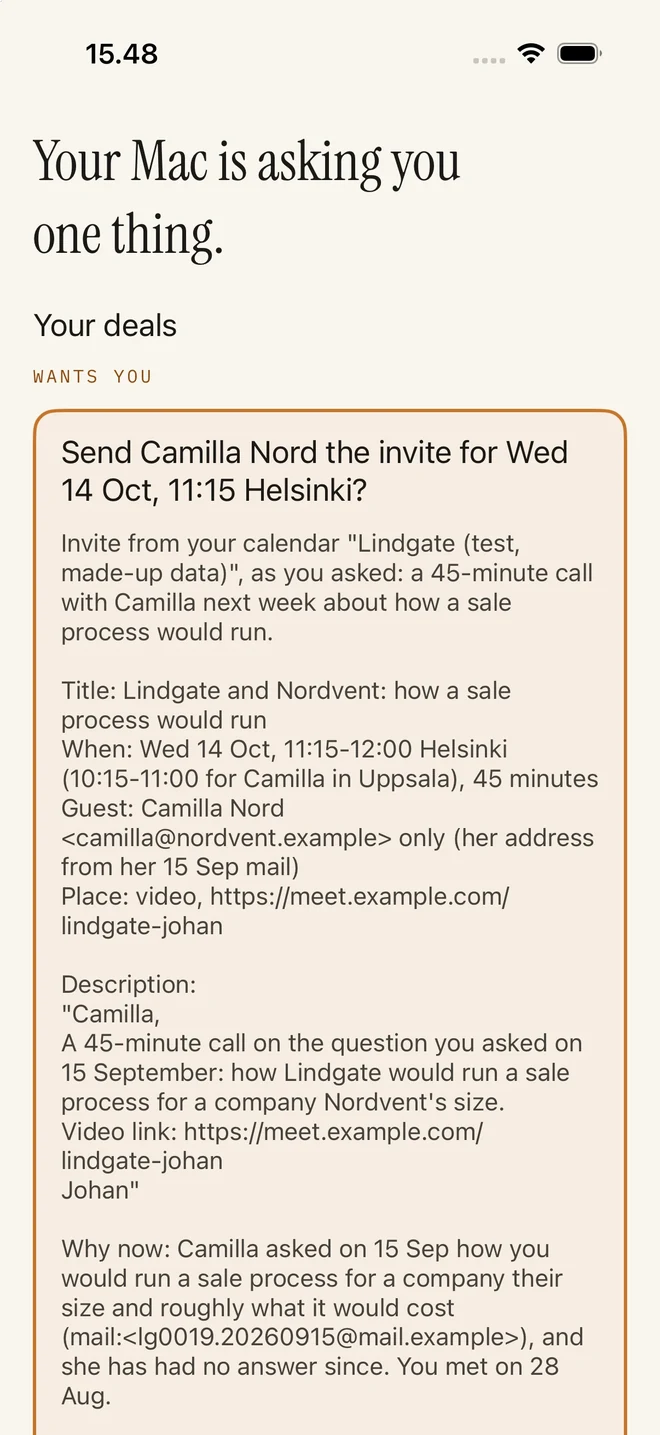
- When Camilla says yes, they propose a free time and send the invitation once Johan approves it.
Lindgate, Nordvent and everyone in them are invented.
You stay the one who writes
The drafts for your next ten leads sit in one view, like one document. You read them through and say out loud what to change as you read, and the next pass takes what you said. Each draft is designed to be checked against the prospect's latest news before it goes out. That's why nothing reads like AI.
Bring your data, or add ours
It works with the company database you already have. Or add our proprietary B2B data layer: over 53 million active companies in France, the UK, Sweden, Norway, Finland, Estonia, Ireland, Lithuania, Latvia, Japan, Australia, Canada (federal corporations), Singapore, Israel, Argentina, Slovakia, Taiwan, Brazil, Romania, Ukraine and four US states (New York, Colorado, Connecticut and Pennsylvania), from the official registers, companies only, with no personal data. It is sold separately, and your own AI, or any AI tool, reaches it through the API and the MCP.
Already paying for AI? Don't pay twice
| A CRM data connector | The Revenue Assistant | |
|---|---|---|
| Price | €499 a month and up | €248 a month for a team of three: the app at €49 and our data layer at €199 |
| Companies | A thousand synced, then more per thousand | No cap on companies synced to your CRM |
| Setup | Authorise a connector, then configure fields and triggers | Open the app and ask it to start |
| Fresh data | The vendor's monitoring | Our data layer, plus a fresh check by your own AI before you write |
| Your history with each company | Not used | Used: your CRM, mail and calendar |
| The way in | Not part of it | Your team's network, introductions, the warm path |
| Where the work happens | The vendor's servers | Your own AI, on your computer |
| What reaches a new cloud | Your CRM's companies | Nothing of yours |
| Pipeline and outreach | Not part of it | The next actions, a business case per prospect, drafts reviewed in a batch |
Text names only. HubSpot, Salesforce, Pipedrive, and Microsoft Dynamics 365 are trademarks of their owners. The Revenue Assistant works with them and is not affiliated with or endorsed by them.
Price
Is it for you?
If your sales team clicks around its CRM by hand and wants nothing running on a laptop, a CRM data connector will suit you better. If you work alone, you may not need a pipeline tool at all.
It is for AI-native teams: advisers in corporate finance and M&A, small funds, consultancies and agencies, brokers and B2B sales teams. A seat is for whoever does the sales work, so a firm of fifty may need three, which is what the app's price includes.
Questions
- Do I need your data layer?
- No. The app works fully without it, on the company database you already have or none at all. The data layer is a product of its own, for teams that want ours, and it works with any agent.
- Is it a CRM?
- No. It works alongside the CRM you have, or keeps its own notes as plain files if you don't have one.
- Does it work with my CRM?
- Yes, if you can use it in a browser. It works in Chrome on your computer, in a window of its own where you sign in as yourself, such as in HubSpot, Salesforce, Pipedrive, or Microsoft Dynamics 365. It is designed to show you each change before it writes it back, and what it writes is your responsibility.
- Where does the research come from?
- Your own CRM, mail and calendar, the services you are signed in to, the public web, and our data layer of over 53 million companies if you add it. Your own AI does the research, on your computer.
- Does it include contact names?
- No. The database holds companies, not people. With The Revenue Assistant, your own AI finds the board, the management and key people from annual reports, the company's website and your team's LinkedIn connections.
- Do we need Claude or ChatGPT?
- Yes, one of them, on your own subscription: Claude (Anthropic, through Claude Code) or ChatGPT (OpenAI, through Codex). The app installs the one you choose.
- Does my clients' correspondence go to your servers?
- No. What your AI reads goes from your computer to your AI provider, under your own agreement, and we never receive it. If your firm has our data layer, the app looks up the companies you work on through it: their names, web domains and register numbers go to us only to answer the lookup and are not stored, and no people's names or deal contents go with them.
- What does it cost?
- The app is €49 a month for your team, with three seats included and €19 for each seat after that. Our B2B data layer is a product of its own, at €199 a month for the whole firm. A team of three with both pays €248 a month. The only other cost is the AI subscription you already pay for.
- Is there a free trial?
- Yes. Download the app and sign in with your work email, and the app is free for 30 days, with no card and nothing to cancel. Buying seats for your team includes those 30 days too, so the first app charge comes after them. It's one free period per person, and it doesn't include our data layer, which is billed from the day you buy and comes with a 30-day money-back guarantee instead. When your team buys seats, everyone who signs in with an invited email is on the plan straight away.
- Where does your data come from?
- Its base is The Company Database (https://thecompanydatabase.com): data from 225 countries in one clean format, companies only and with no people in it. 32 of them are the official company registers, whole; in the 193 more, it holds the companies with an LEI, from GLEIF's open register, which are mostly the larger ones. The data layer adds what the registers don't give you in one place: websites where the register has them (Finland and Norway so far), trading names for over 3.8 million companies, the number of sites for about 880,000, company size for over 6 million, revenue bands for about 1.45 million, group structure (an LEI and the parent company) for about 600,000, and Sweden's marketing opt-out flags. Your own AI's research comes on top of that, on your Mac. Company size and revenue come from the accounts companies file, so a company that files none, or only a PDF, has no band.
- What's in the data layer?
- Over 53 million active companies with data from 225 countries, reached through the API and the MCP at https://api.therevenueassistant.com from any AI tool. 32 countries come from their official company registers: France, the UK, Sweden, Norway, Finland, Denmark, Estonia, Ireland, Lithuania, Latvia, Belgium, Switzerland, Czechia, Slovakia, Slovenia, Croatia, Serbia, Romania, Ukraine, Malta, Cyprus, Japan, Australia, Canada (federal corporations), Singapore, Israel, Taiwan, Brazil, Argentina, Chile, Ecuador and four US states (New York, Colorado, Connecticut and Pennsylvania). In the 193 more, it has the companies with an LEI. There is no limit on use and no cap on companies synced to your CRM; very large bulk exports fall under fair use. The data is for your own use, not resale. The companies you look up go to us only to answer the lookup and are not stored.
- Does it send email for me?
- It drafts each message for you to send, edit or drop, and what you send goes from your own account. Read each draft before you approve it: like any AI, it can get things wrong.
- Will it book meetings for me?
- Yes, in Google Calendar or Outlook. It is designed to show you the invitation as a card first, and with the Mac app the card can also reach your iPhone, where answering it sends the invitation.
- Does it work on Windows?
- Yes. There's a Mac app and a Windows app: https://therevenueassistant.com/download/windows.
Try it with your team
Download the app and sign in with your work email: it's free for 30 days, with no card. Then it's €49 a month for a team of three, and €19 for each seat after that. Our B2B data layer is €199 a month for the whole firm, with a 30-day money-back guarantee.